Most AI companion apps share a common design: your personal conversations travel to a cloud server, pass through a proprietary model, and come back. Your data funds someone else’s training pipeline. Drop your connection and the companion goes silent. The context window fills up and the companion forgets who you are.
I built Hana AI to solve all three. It is a fully offline, privacy-first virtual companion that runs a local LLM on your own hardware, keeps every byte of data on your device, and maintains a persistent, structured memory of your relationship — without a single vector database or cloud API call.
This post is a detailed walkthrough of the architecture, the engineering decisions that shaped it, and the honest tradeoffs that come with building on the edge.
The Problem Worth Solving
The market for AI companions is growing fast, but the dominant solutions share a frustrating design pattern: privacy is sacrificed for capability. Apps like Replika and Character.ai store your conversations on remote servers, require persistent internet access, and charge subscription fees for features that should be fundamentally local.
Beyond privacy, there is a more subtle but equally frustrating technical problem: context amnesia. LLMs have finite context windows. In a long-running companion relationship — one that accumulates weeks or months of conversation — the model eventually forgets things it was told at the beginning. It stops knowing your name, your interests, your inside jokes. The relationship resets.
Hana AI treats both of these as core engineering problems, not acceptable limitations.
The Core Innovation: Stateful Client-Side Orchestration
The most important architectural decision in Hana AI is not which model it uses or how the prompts are structured. It is where the state lives.
Most AI agent frameworks place state on the server: a Python process that tracks conversation history, manages embeddings, queries a vector store, and orchestrates LLM calls. This is fine for cloud deployments, but it creates a heavyweight dependency that is hard to run locally on consumer hardware.
Hana AI inverts this model entirely.
The React Native client owns all state: companion properties, relationship progression, mood calculation, memory retrieval, and conversation history formatting. The FastAPI backend is kept deliberately stateless — it receives a fully assembled context payload, compiles a prompt, forwards it to Ollama, runs regex extraction on the response, and returns JSON. That is all it does. It holds no sessions, no database connections, and no user data.
This inversion has significant practical consequences. The backend can be restarted at any time without losing state. The client can function in a degraded mode if the server is unreachable. The entire intelligence pipeline can be swapped out by changing a single environment variable pointing to a different Ollama model.
System Architecture
The full data flow across client, backend, and inference engine looks like this:
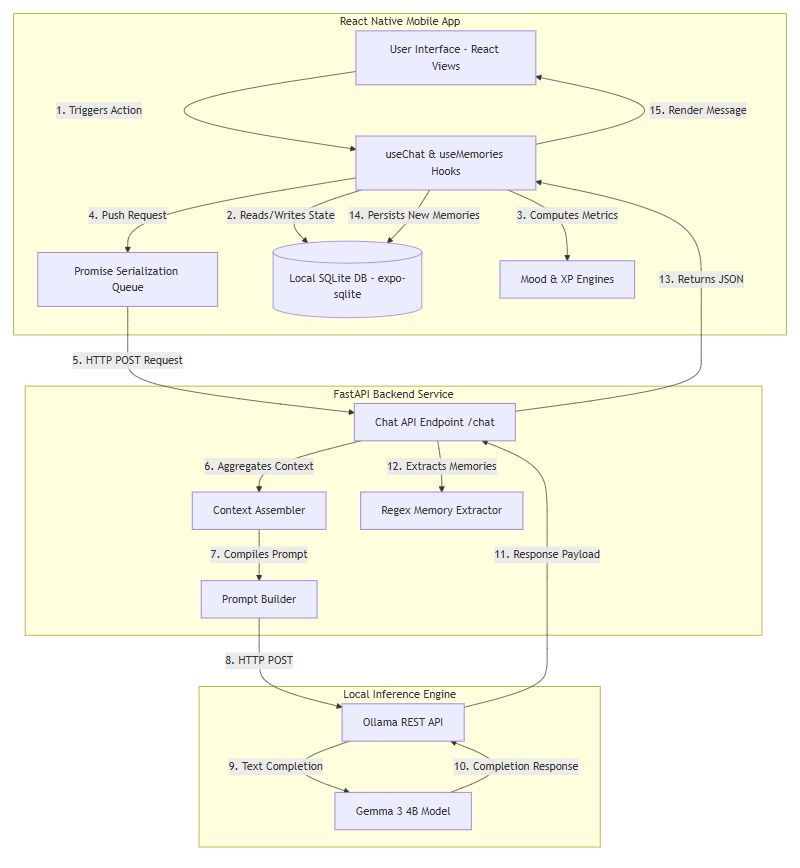
Fifteen steps from keypress to rendered response, and every one of them runs locally on your LAN.
Technology Stack
| Layer | Technology | Why |
|---|---|---|
| Mobile Frontend | React Native + Expo SDK 56 | Single codebase for Android and iOS with native SQLite access |
| Routing | expo-router (file-system based) | Declarative tab layout with deep-linked memory edit screens |
| List Rendering | @shopify/flash-list | Cell recycling eliminates layout recalculations on long chat logs |
| Local Database | SQLite via expo-sqlite | Zero-config embedded storage with full transaction and index support |
| Backend API | FastAPI + Pydantic | Async Python with automatic schema validation and OpenAPI docs |
| HTTP Client | httpx.AsyncClient | Non-blocking requests to the Ollama daemon |
| LLM Runtime | Ollama | Manages model loading, inference batching, and REST API surface |
| Default Model | Gemma 3 4B | Edge-optimized, runs well on standard laptop CPUs |
| Config Management | pydantic-settings | Environment variable binding for Ollama endpoint and model version |
| ASGI Server | Uvicorn | UV-loop based dispatch for the FastAPI service |
Tracing a Single Message End-to-End
The best way to understand how these layers interact is to trace a single user message through the entire system.
User types: “I really love playing Minecraft”
Step 1: Serialization Queue
The message hits sendMessage in the useChat hook, which pushes it onto a serialized Promise chain:
1 | const sendQueueRef = useRef<Promise<void>>(Promise.resolve()); |
This is a quiet but important design choice. LLM generation is slow. If a user sends a second message before the first response arrives, a naive implementation creates a race condition: two concurrent database writes, two concurrent XP updates, two concurrent API calls — and no guarantee about which renders first. The Promise chain serializes everything. Every message queues behind the previous one and executes in strict order.
Step 2: XP and Relationship Progression
Before the API call happens, the client updates the relationship state. Every message awards XP (+5) and Affinity (+2) to the relationship_stats table. The system checks whether the accumulated XP has crossed a level threshold:
| XP Threshold | Relationship Level |
|---|---|
| 0 | Stranger |
| 100 | Friend |
| 300 | Close Friend |
| 700 | Partner |
If the user crosses a boundary, a RelationshipEvent system message is inserted into the messages table and rendered inline in the chat UI. The companion’s behavioral profile updates immediately — a Partner-level companion responds with more warmth and familiarity than a Stranger-level one, because these states are injected as behavioral guardrails into the system prompt.
Step 3: Context Assembly
Three concurrent SQLite queries gather the context payload:
- Last 20 messages for recent history
- Older messages for
ConversationSummaryServiceto scan for high-value statements - Companion profile, traits, and current mood from
CompanionContextBuilder - Up to 10 relevant memories from
MemoryContextBuilder
The conversation summary service is worth a closer look. Rather than sending the entire conversation history (which would overflow any 4B model’s context window), it scans older messages with regular expressions looking for phrases like “I like”, “my birthday”, “I want to”. The resulting filtered log gives the LLM a sense of the relationship’s history without blowing the context budget.
Step 4: Backend Prompt Compilation
The FastAPI endpoint receives the fully assembled payload as a ChatRequest Pydantic model:
1 | { |
The build_companion_prompt function assembles this into a single string that includes the companion’s identity, behavioral guardrails, relationship context, long-term memories, conversation summary, and recent message history. The prompt ends with [Hana]: to anchor the model’s completion behavior.
The behavioral guardrails are worth quoting directly, because they illustrate a deliberate choice about where intelligence lives:
“Never claim preferences, memories, events, promises, or relationship history that are not present in the context.”
“If context is missing or uncertain, ask naturally instead of pretending to remember.”
Rather than hoping the model stays consistent on its own, these instructions explicitly prohibit hallucination of relationship history. The model is given a bounded role: respond naturally within the facts it has been given.
Step 5: Local Inference
The compiled prompt goes to http://localhost:11434/api/generate via httpx.AsyncClient. Ollama runs inference using gemma3:4b — a 4-billion parameter model that runs comfortably on a standard laptop CPU. The response arrives as a complete text completion (streaming is not currently implemented, which is an acknowledged limitation discussed later).
Step 6: Memory Extraction
While the response travels back to the client, the backend’s MemoryExtractor scans the original user message with regular expressions:
1 | r'\bi (?:really )?(?:love|enjoy|like)\s+(.+?)(?:[.!?]|$)' |
This captures “playing Minecraft” and constructs a structured memory object:
1 | { |
The memory is returned alongside the companion’s response in the ChatResponse payload.
Step 7: Deduplication and Persistence
Back on the client, MemoryExtractionPersister runs a deduplication check before writing:
1 | SELECT * FROM memories |
If the memory already exists, it is skipped. If it is new, it is inserted into the memories table along with its tags in memory_tags. The companion’s response is then saved to the messages table, and the React state updates to render the new chat bubble.
The Memory System
The memory system is where Hana AI makes its most interesting architectural bet: no vector databases.
Semantic search with embeddings is the obvious solution for a companion that needs to recall relevant facts from a growing history. But running an embedding model locally on a mobile device adds significant overhead — both in storage and computation. It introduces another dependency to install and manage. And for a companion with hundreds rather than millions of memories, the marginal precision gain over a well-designed keyword retrieval system is often not worth the cost.
Instead, Hana AI uses a multi-tier SQLite retrieval strategy.
Memory Types
The MemoryType enum covers nine categories that structure how memories are stored and retrieved:
Preference— user choices and tastesFact— general personal dataGoal— stated objectivesEvent— specific occurrencesRelationship— shared history with the companionConversation— notable chat momentsReminder— user tasksInterest— hobbies and passionsPersonalDetail— demographic information
Retrieval Strategy
When the user sends a message, MemoryContextBuilder runs three parallel queries and merges the results:
1 | -- Keyword match across title, content, and tags |
The three channels — pinned records, high-importance records, and keyword matches — are merged into a single JavaScript Map keyed by memory ID, which handles deduplication automatically. The merged set is then sorted:
1 | Array.from(unique.values()).sort((a, b) => { |
Pinned memories surface first, then high-importance ones, then recent ones. The top 10 are sliced and injected into the prompt as plain text blocks. The model sees them as factual context, not search results.
Schema
Two tables handle persistent memory storage, with strategic indices on every frequently queried field:
1 | CREATE TABLE IF NOT EXISTS memories ( |
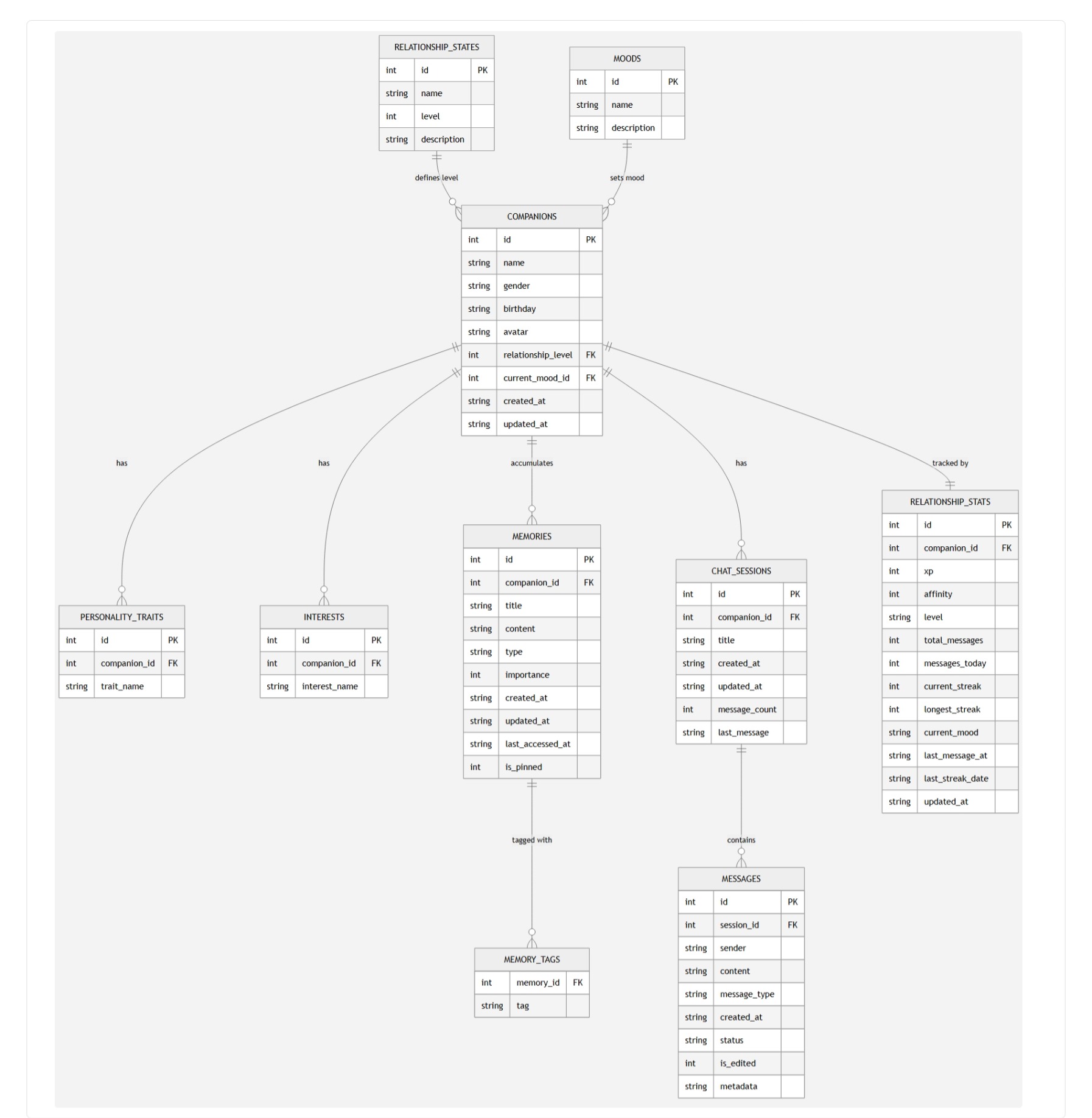
The full schema spans ten tables: relationship_states, moods, companions, personality_traits, interests, memories, memory_tags, chat_sessions, messages, and relationship_stats. WAL mode and foreign key enforcement are set at database initialization:
1 | PRAGMA journal_mode = WAL; |
WAL mode is important here because React Native’s JavaScript runtime and native SQLite bridge can issue concurrent reads. WAL allows readers to proceed without blocking writers, which keeps the UI responsive during chat logging operations.
The Mood Engine
The companion’s mood is computed deterministically on the client, not generated by the LLM.
This is a deliberate choice. Asking an LLM to decide its own emotional state is a recipe for inconsistency. On one call it might respond as “Happy”, on the next as “Melancholy”, with no coherent thread connecting them. Letting the model hallucinate its own emotional continuity defeats the purpose of a persistent companion.
Instead, MoodEngine evaluates concrete parameters at runtime:
- Time of day: Late-night sessions trigger “Sleepy”
- Message volume: 10+ messages today triggers “Playful”; 20+ triggers “Excited”
- Recency: More than 2 days of silence triggers “Concerned”
The resulting MoodType — one of Happy, Curious, Playful, Sleepy, Excited, or Concerned — is stored in relationship_stats, rendered visually in the UI with companion-specific colors and emojis, and injected into the system prompt as a behavioral parameter. The LLM adopts the mood as an instruction, not a choice.
Database Architecture: Full Entity Relationship
The entity relationship model for the full schema:
API Surface
The FastAPI backend exposes three endpoints.
POST /api/v1/chat
The primary inference endpoint. Takes a fully assembled context payload and returns a response with extracted memories:
Request:
1 | { |
Response:
1 | { |
Error handling covers two failure modes: Pydantic returns 422 Unprocessable Entity if the request schema is malformed; an httpx.ConnectError from a downed Ollama instance is caught in ChatGenerationService.ts and displayed to the user as “Sorry, I’m having trouble thinking right now.” rather than crashing the app.
GET /api/v1/health
Returns {"status": "ok", "app": "Hana AI Backend"}. Standard readiness probe.
GET /api/v1/debug-memory
A developer utility that accepts a message query parameter and returns the regex extraction output without hitting Ollama. Useful for testing whether the extraction patterns are firing correctly on new sentence structures before modifying the main pipeline.
Feature Highlights
Companion Onboarding Wizard
A multi-step form in app/onboarding/index.tsx collects name, gender, birthday, and personality traits with animated slide transitions between steps. On completion, it writes to companions, personality_traits, and relationship_stats, then redirects to the main tab layout. The entire onboarding state is local and persists immediately.
Memory Bank UI
The memory management screen renders cards filtered by category pills: All, Pinned, Important, Personal, Interests, Chats. Search input runs in-memory queries against the SQLite store. Individual memories link to a deep-linked editing form at app/memory/[id].tsx, where users can pin, edit, or delete entries. Back-navigation triggers context refresh to keep the list current.
XP and Streak Tracking
The relationship_stats table tracks current streak, longest streak, total messages, and messages today alongside XP and affinity. The streak logic checks last_streak_date against the current date: consecutive-day conversations extend the streak, missed days reset it. These metrics feed into both the mood engine and the companion’s behavioral prompt context.
Honest Assessment: What Needs Work
No project post is complete without looking at the gaps. Here are the known limitations, in order of impact.
Brittle keyword matching. SQL LIKE queries cannot capture semantic similarity. A user who says “I’m exhausted all the time” will not surface memories tagged with “sleep” or “fatigue.” This is the clearest case for eventually adding local embedding-based retrieval, even at the cost of added infrastructure.
Blocking inference. The application requests a complete text completion from Ollama before rendering anything. On slower hardware, this means several seconds of silence. Streaming the response token-by-token would dramatically improve the perceived responsiveness of the companion without changing any of the core architecture.
Hardcoded IP address. ApiClient.ts contains a hardcoded local IP (10.101.70.194) for connecting a physical test device to the development server. This needs to be replaced with a settings screen or runtime discovery mechanism before the app can be handed to someone else without manual file edits.
Open local network surface. The FastAPI server runs without authentication middleware. This is acceptable when Ollama is bound strictly to localhost, but anyone on the same Wi-Fi who knows the IP can issue requests to the /chat endpoint. A simple shared secret or local-only binding constraint would close this.
Onboarding interest gap. The onboarding wizard defines an INTERESTS array in code but never renders a selection step. New companions always start with empty interests, which the user must populate manually through the profile editor. The fix is a few lines of UI; the oversight is noted here for completeness.
What This Project Demonstrates
Building Hana AI required making real decisions under real constraints.
The decision to keep the backend stateless was not the easiest path — it required the client to carry more responsibility for context assembly and state management than is typical in mobile applications. But it produced a system that is dramatically simpler to deploy, easier to debug, and resilient to server restarts.
The decision to skip vector databases was a calculated bet. For a companion with a bounded number of memories on a mobile device, a well-indexed SQLite store with priority-based retrieval performs well enough that the added complexity of embedding infrastructure is not justified yet. When the memory bank grows into the thousands, that calculus changes, and the architecture is open enough to add that layer without restructuring what already exists.
The Promise serialization queue is the kind of solution that does not show up in architecture diagrams but makes the system actually reliable. Race conditions in chat applications are subtle and reproducible only under specific timing conditions. Designing against them upfront rather than debugging them in production is the right call.
The deterministic mood engine reflects a broader principle: give the LLM a defined role and enforce its boundaries structurally, not through prompt suggestions. The model is good at generating natural language. It is not the right tool for tracking whether the user chatted two days ago. Compute that deterministically, inject it as a fact, and let the model respond within those facts.
Stack Summary
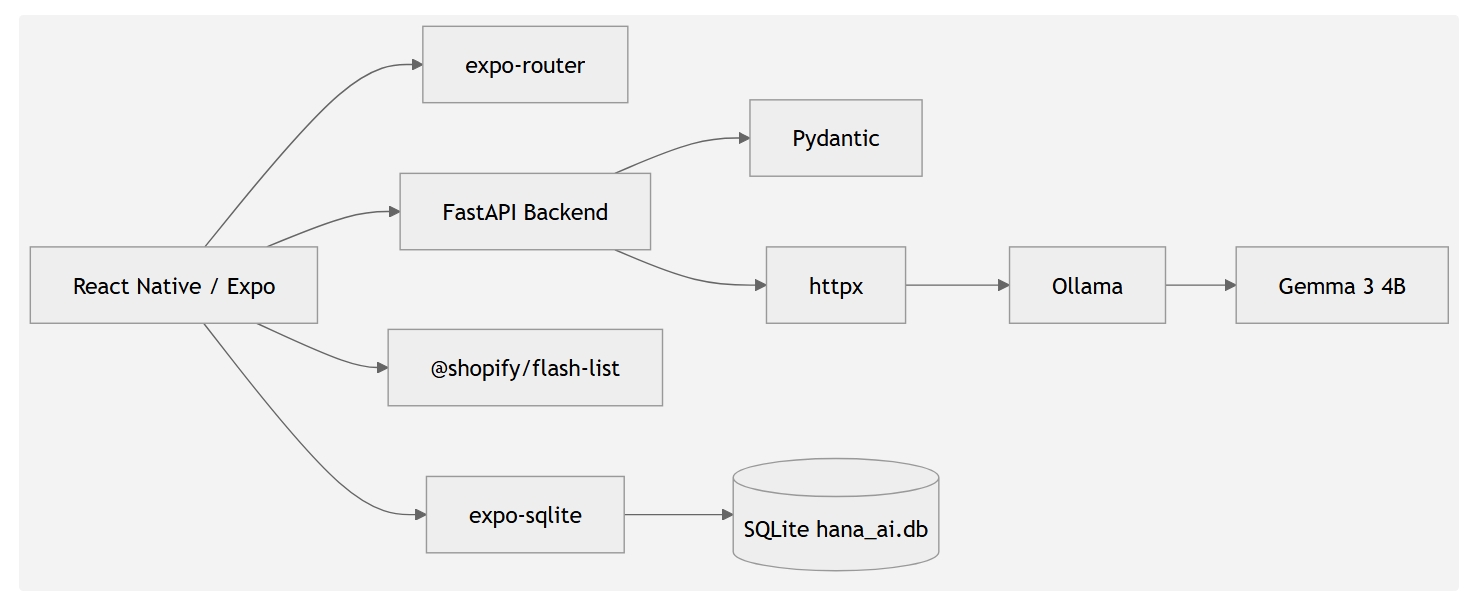
Zero cloud. Zero subscriptions. Zero telemetry. The companion runs on your hardware, remembers what you tell it, and does not report home.
Hana AI is an ongoing personal project. The repository is private during active development.
About this Post
This post is written by Kaustubh Chauhan, licensed under CC BY-NC 4.0.